Instant Review
Watch the recording in-browser with every note positioned exactly where it was written.
CueCollab loads locally saved recordings directly in the browser and places all session notes alongside the footage — synced by timecode so you can seek to any moment with a single click.
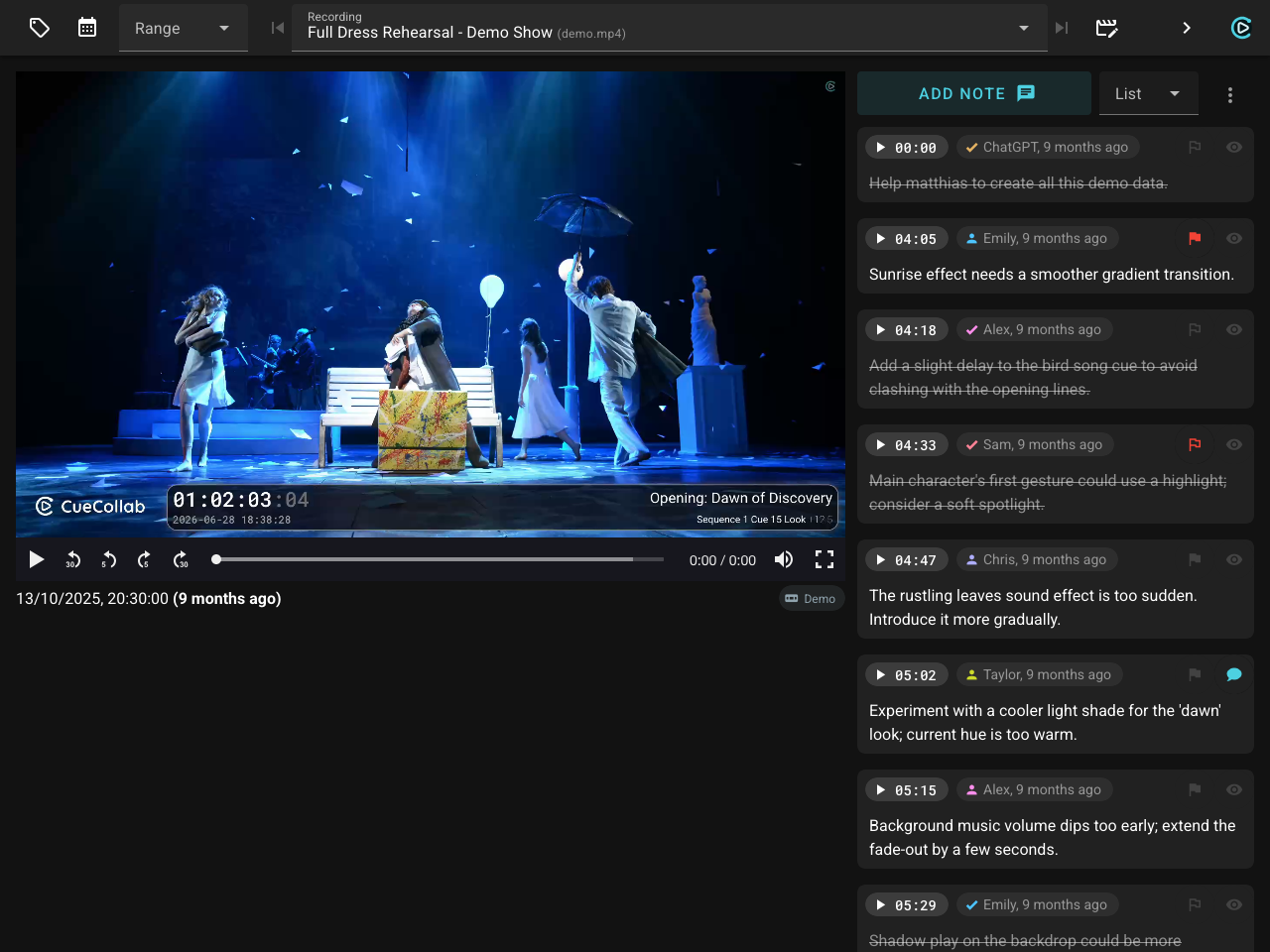
The Review module opens locally saved recordings directly in the browser — no file conversion, no external player. Every note written during the session appears in the sidebar, sorted by position in the video. Click any note’s timestamp chip to jump straight to that moment in the footage.
Notes are grouped by scene and filterable by date, range, tag, or recording device. Keyboard shortcuts (Shift+↑ / Shift+↓) step through recordings without touching the selector.
While watching, press Shift+N to add a new note at the current playback position. Timecode, scene, author, and list are pre-filled automatically — the note goes straight to the shared Notepad where the rest of the team can see and act on it.
Press Shift+A to draw directly on a paused video frame. The annotation editor lets you mark up the exact moment in the footage — circle a problematic transition, highlight a position on stage, or point out a lighting issue — then attach the drawing to an existing note or save it as a new one. Annotations are stored with the note and visible across the app wherever notes appear.
When the review is done, export the full note list as plain text, a one-line-per-note summary, or a complete Excel spreadsheet — all filtered to exactly what’s currently visible.
Use Case
After a dress rehearsal, the director opens Review and works through the recording with all session notes already loaded in the sidebar. Each note shows exactly when it was written — clicking the timestamp chip jumps the video to that moment instantly. When a transition looks off on screen, they press Shift+N and add a new note right there. It appears immediately in the Notepad, ready for the tech team to action before the next run.
The details that make the difference.
Every feature in CueCollab exists because someone needed it in a real production. No fluff — just the tools that actually matter when the show is running.
Tags & Department Lists
Organize cues and notes with tags and department lists. Filter to only what is relevant to your role.
Draw on Video Frames
Pause the recording in Review and draw directly on the frame — circle a problematic transition, mark a position on stage, highlight a lighting issue. Save the annotation to an existing note or create a new one.
Audio Notes & Offline Transcription
Record a voice note with one tap to stay focused on the show. The audio is saved with the note and automatically converted to text in the background, fully offline.
OSC & MIDI Control
Control CueCollab remotely via OSC or MIDI Show Control from lighting consoles, show controllers, or custom scripts.
Excel Import & Export
Export notes to Excel for sharing, or import data in bulk for easy editing. Full columns, all metadata, both ways.
HTTPS & Secure Access
Enable a built-in HTTPS server with a self-signed or custom certificate. Secure connections make audio recording available on all devices and let you access CueCollab safely over a VPN.
No Internet Required
Everything runs on the local network. No cloud dependency — the show goes on even without internet.
Browser-Based Clients
Every team member connects from their own browser — no app to install on phones, tablets, or laptops.
URL-Stored Preferences
Display layouts, filters, and preferences are saved in the URL. Bookmark a configured page and share it with the team.
Message the Whole House
Send an announcement in one tap — it appears instantly on every browser, display, and callsheet on the network.
One Tap from Your Phone
Quick Entry turns any phone into a one-tap notepad. Configure preset phrases and fire them with a tap — timestamped to the current cue and shared with the whole team instantly.
Save the Show, Restore in Seconds
Showfiles snapshot the entire production state — cues, ranges, settings, everything. Restore before the next run or hand it off to the next crew.
No Timecode? No Problem.
No TC feed? Notes are stamped to the current cue name and time-since-cue instead. The workflow stays the same — nothing breaks.
Flag It. Track It. Resolve It.
Colored flags mark notes that need urgent attention. Resolve them when actioned — who resolved it and when is tracked automatically.
Audio Standby & Call Alerts
The callsheet plays a configurable sound when a cue enters standby and again when it comes up. Eyes on stage, not the screen — the sound tells you what's next.
Auto-Reset for Repeating Shows
Running multiple performances a day? The callsheet resets to cue one automatically when timecode restarts — ready for the next audience without touching a thing.
Easy Sharing
Export note lists as plain text or Excel and send them to anyone. Recordings are standard MP4 files with timecode and cue info burned in — no special software, no account, no context lost.
Battle-Tested Since 2021
Built and refined through real productions — not vibe-coded, not prototyped. Every feature earned its place on an actual show night.
Trigger Additional Recorders at Once
Start several OBS instances or HyperDecks simultaneously — one for review, others for backup or archive. All triggered together, automatically.
Recording Autopilot
Timecode starts — recording starts. Timecode stops — recording stops, after a configurable delay. Jumps restart the file. Short accidental takes are cancelled automatically. No operator needed.
Scheduled Recording
Set recording to start and stop at a fixed time — once or weekly. No timecode needed. Useful for unattended sessions, daily archives, or any situation where the clock is the trigger.